
RESTAURANT POS • TABLES • KITCHEN • BRANCHES
Run your restaurant from one screen.
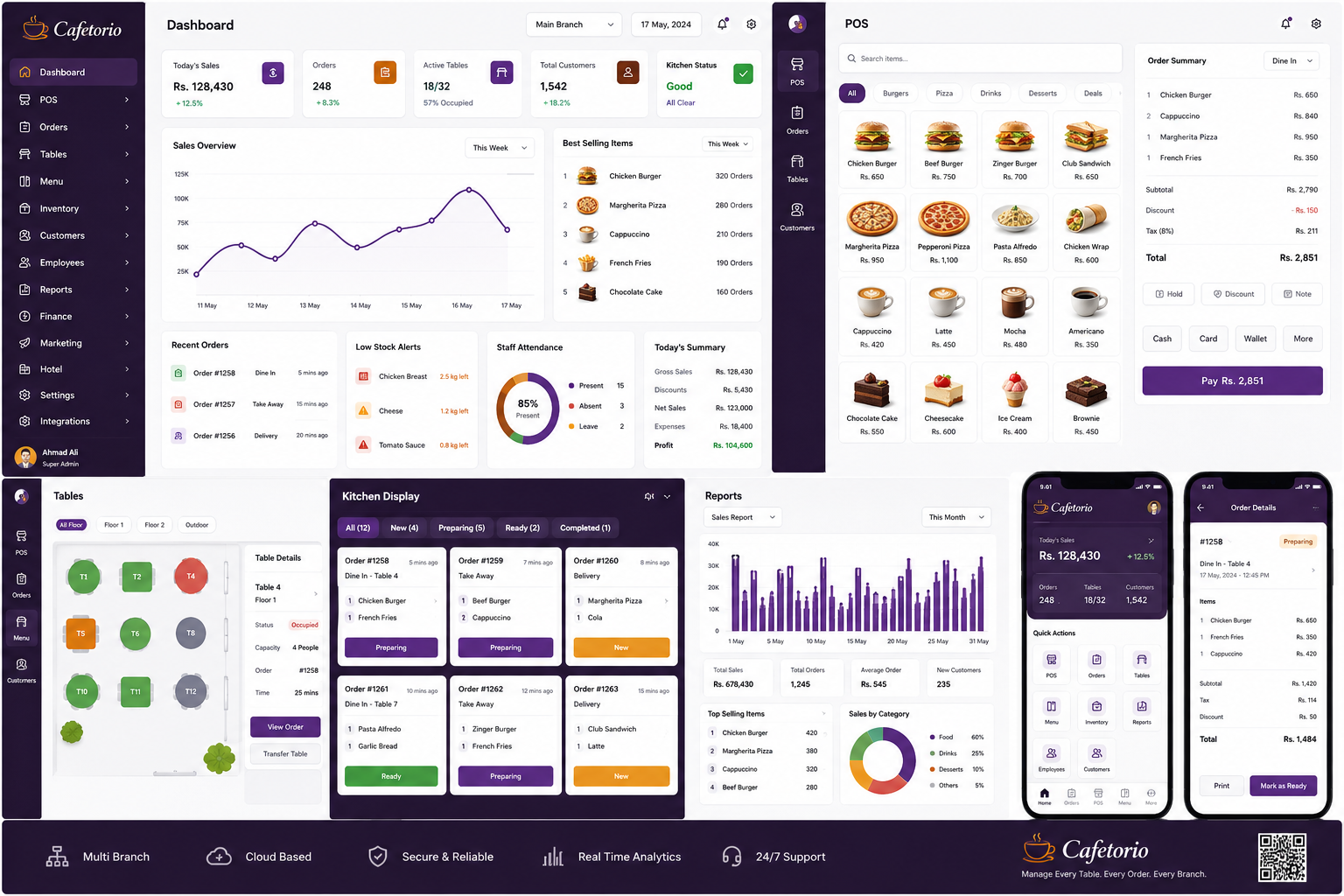
Cafetorio connects your billing, tables, kitchen, menu, staff, branches and reports in one simple restaurant management system.
✓ No commission✓ 7-day selected-plan trial✓ Pakistan-ready billing✓ Multi-branch control
No card required. Your first branch starts with 8 editable tables and a ready Pakistani café menu.
Today SalesRs. 48,750
Live Orders18
Tables6 / 8
POSFast billing
KDSKitchen workflow
MENUPublic menu link
8Starter tables
∞Business branches
BUILT FOR FOOD BUSINESSES
One system for every restaurant format
Whether you run one café or a growing restaurant group, Cafetorio keeps front counter, kitchen and management connected.
ONE CONNECTED WORKFLOW
From order to kitchen to reports.
Every action updates the same business workspace. Cashier, waiter, kitchen team and owner always see the right information.
Create Restaurant AccountTake OrderDine-in, takeaway or delivery
Send to KitchenTickets appear in the kitchen queue
Prepare & ServeNew → Preparing → Ready
Print BillClean customer receipt and payment
Track OperationsTables, menu, customers and stock
Review PerformanceSales and branch reports
ALL-IN-ONE RESTAURANT SOFTWARE
Everything your team needs in one place
Use only the modules you need today and unlock more as your business grows.
Smart POS
Create orders, discounts, payments and printable customer receipts.
Table Management
Add, edit and monitor available, occupied, reserved and cleaning tables.
Kitchen Display
Kitchen staff can move tickets from new to preparing, ready and completed.
Menu Management
Manage categories, Pakistani menu items, prices and availability.
Branch Dashboards
Each branch has its own sales, orders, tables and kitchen view.
Inventory
Track stock, units, minimum levels and costs.
Customers & Staff
Keep customer and employee records connected to your business.
Reports
Review orders, sales and top-performing menu items.
Finance
Track income, expenses and profit on eligible plans.
SIMPLE PRICING
Choose the plan that fits your restaurant
Every account starts with a 7-day trial of the plan you select. Upgrade when you are ready to continue.
Starter
Rs. 2,500/ month
Rs. 25,000 / year- ✓ 1 Branch
- ✓ Unlimited Employees
- ✓ POS, Orders & Receipts
- ✓ Tables, Menu & Kitchen
- ✓ Daily Sales Dashboard
- ✓ Basic Reports
Professional
Rs. 4,500/ month
Rs. 45,000 / year- ✓ Up to 3 Branches
- ✓ Unlimited Employees
- ✓ Everything in Starter
- ✓ Inventory & Customers
- ✓ Advanced Reports
- ✓ Branch Selector & Dashboards
Business
Rs. 5,999/ month
Rs. 59,990 / year- ✓ Unlimited Branches
- ✓ Unlimited Employees
- ✓ Everything in Professional
- ✓ Finance & P&L
- ✓ Central Multi-branch Control
- ✓ Role-based Access
RESTAURANT OWNERS
A simpler way to manage daily operations
Approved customer feedback appears here.
No public reviews yetOnly genuine feedback approved by Cafetorio admin is shown here.
Share your Cafetorio feedback
FAQ
Common questions
What happens after the free trial?
Your restaurant data stays saved, but paid features lock until a subscription is approved.
How do I activate my plan?
Select monthly or yearly billing, pay the calculated amount, upload the payment screenshot and wait for Super Admin approval.
Can I manage multiple branches?
Yes. Starter supports 1 branch, Professional up to 3 branches and Business supports unlimited branches.
Does every branch have a separate dashboard?
Yes. Each branch has its own sales, orders, tables and kitchen view while the owner keeps central control.
Can customers see my menu online?
Yes. Every restaurant can publish a branded profile containing contact details, timings and active menu prices.
READY TO GET STARTED?
Bring your restaurant operations into one dashboard.
Start the free trial, set up your menu and tables, then activate the plan that fits your business.